Your NES library. Offline and one tap away.
Retro Nes Emulator puts 210 classic NES games on your phone. Download a game once, about 128 KB, and play it anywhere: no signal, no account, no fuss. Just press start.
The first release is on its way. Check back soon.
- No account
- No ads in the player
- No tracking
- Android 6.0+
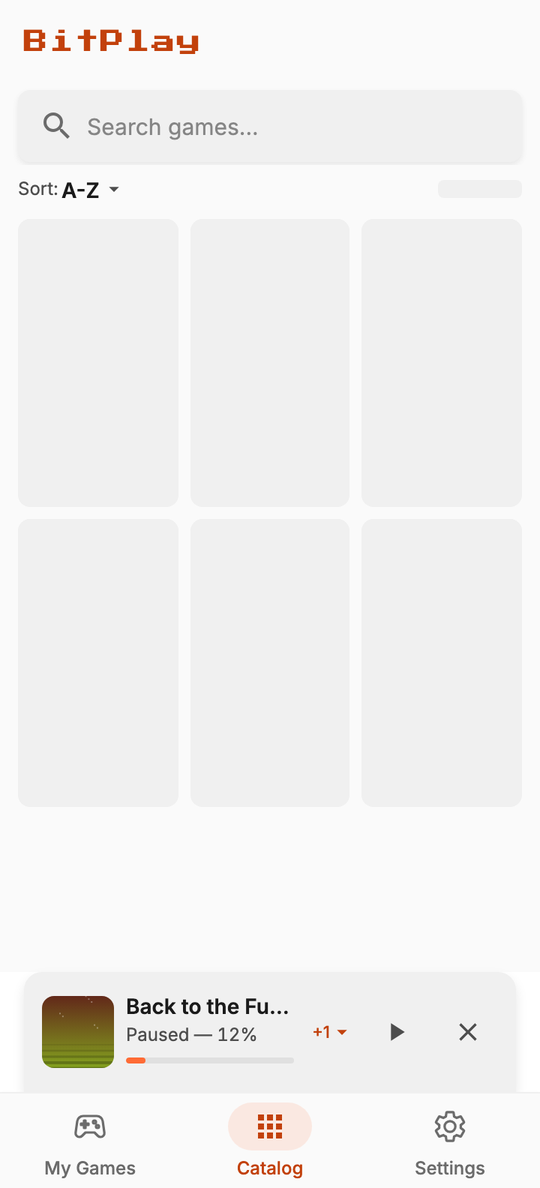
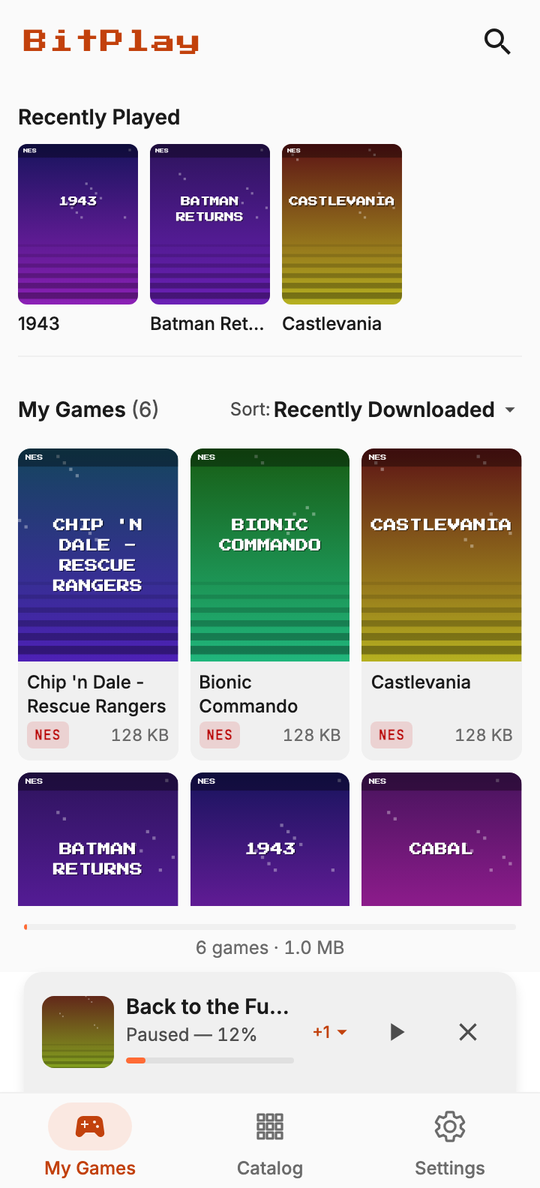
From “what should I play?” to “press start” in three taps
No sign-up, no launcher, no settings maze. Retro Nes Emulator is built around the only thing you came for.
Browse the shelf
Scroll 210 classic NES games on a clean cover grid. Search by name, sort by title or size, and open any game to see its preview clip.
Tap to download
Each game is about 128 KB. One tap and it lands on your phone in a blink, with progress you can follow from anywhere in the app.
Press start
Turn your phone sideways and play with big on-screen buttons, a Bluetooth gamepad or a keyboard. Pick up exactly where you left off, every time.
Everything a retro fan wants. Nothing they don't.
Retro Nes Emulator does one job, playing NES games on your phone, and does it with care. Here is what you get.
Find your next favourite
A library that feels like a shelf of cartridges, not a spreadsheet.
210-game catalog
A three-column cover grid with real box art, so you recognise your games at a glance. Works the moment you open the app.
Instant search
Type two letters and the grid narrows as you go, with your matches highlighted. Recent searches are one tap away.
Sort it your way
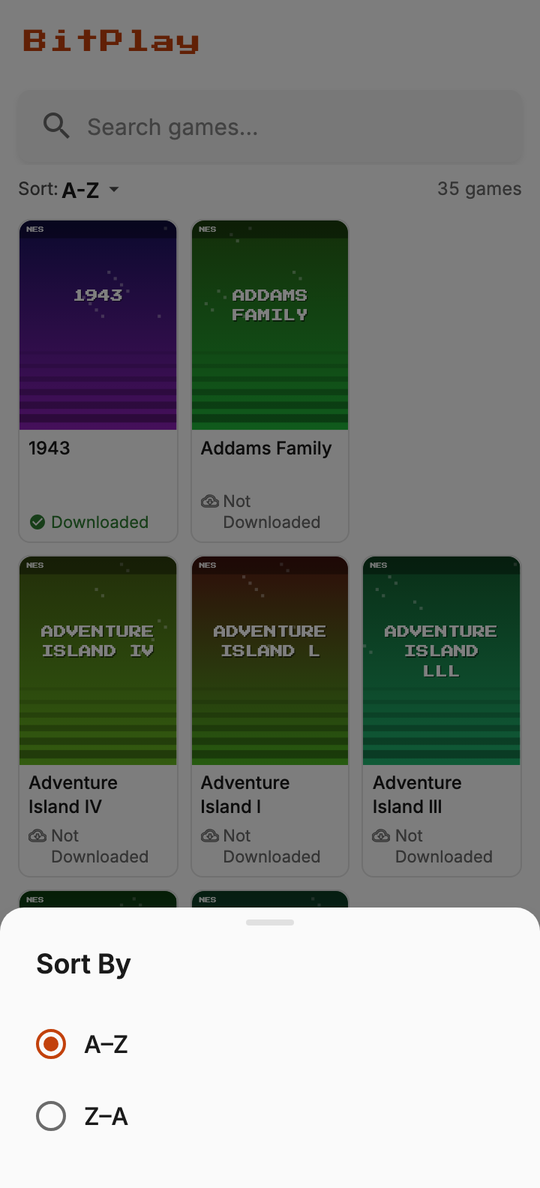
A to Z, Z to A, smallest first or largest first in the catalog. In My Games, add last played and recently downloaded.
Preview before you play
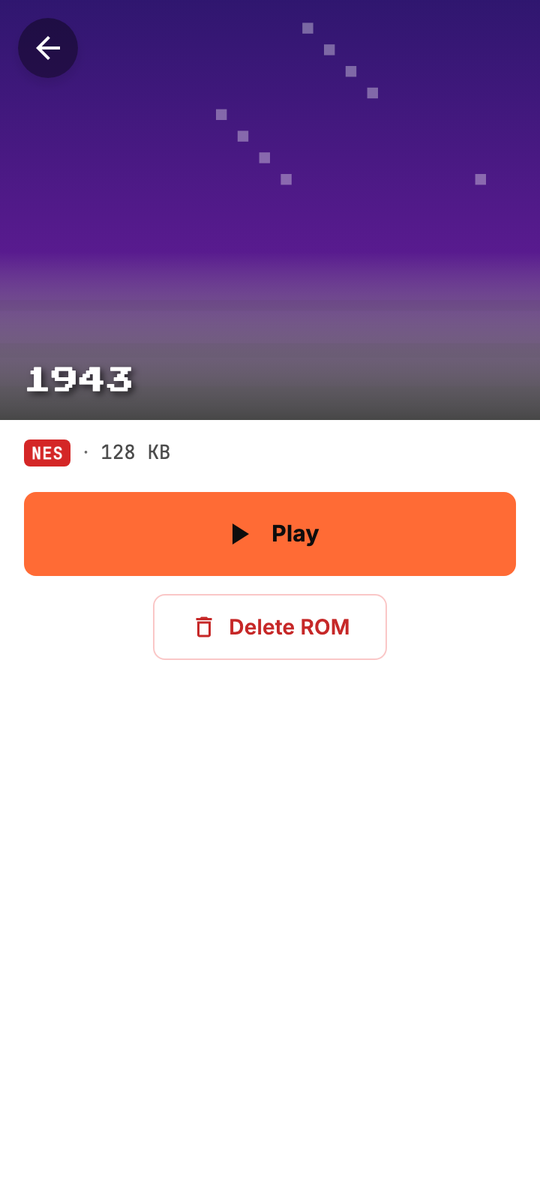
Open a game and its gameplay clip plays right in the header, muted and looping, once the cover has loaded.
Downloads that stay out of your way
Tiny files, a proper download manager, and no surprises.
One-tap, tiny downloads
Games are around 128 KB, so they arrive in moments, even on a slow connection. No account, no store, no waiting room.
A real download manager
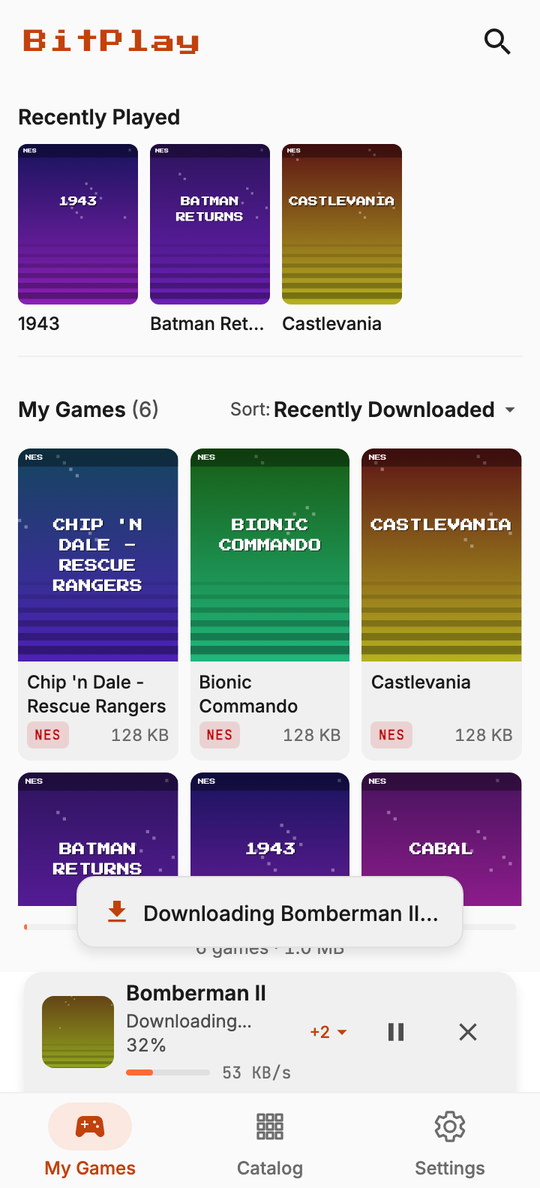
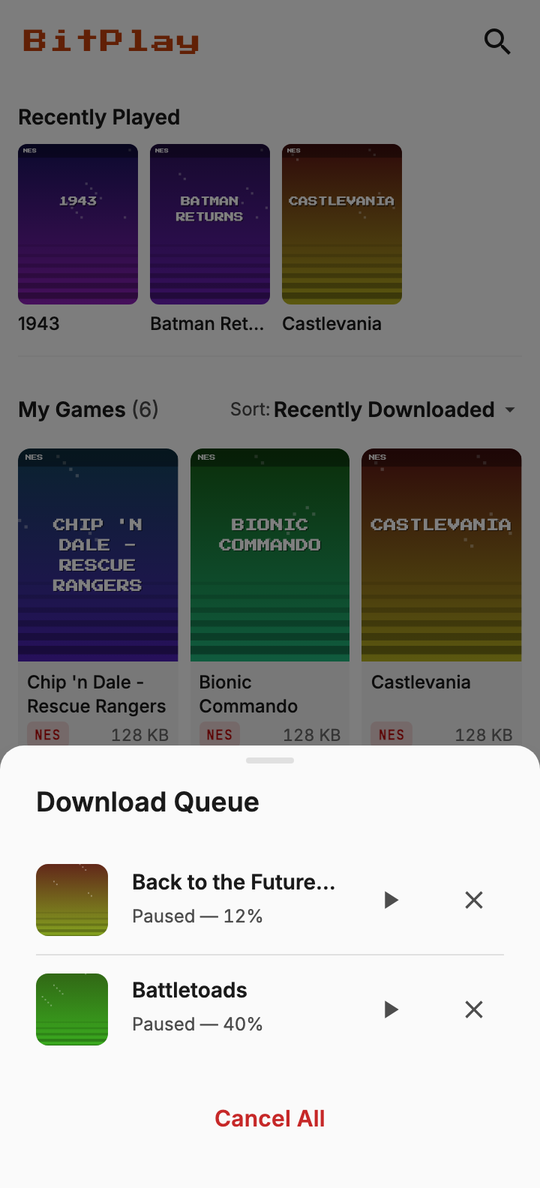
A live progress dock and a queue you can open from any tab. Pause, resume or cancel any download; two run at a time and the rest wait their turn.
Checked and repairable
Every file is verified after it arrives. If one is damaged or a download fails, Retro Nes Emulator says so and offers a one-tap re-download.
Storage-smart
A storage bar in My Games shows what your library uses. Retro Nes Emulator warns you when space is low and refuses to fill your phone.
Built for your thumbs
It should feel like picking up a real controller.
Big, always-there controls
A generous D-pad, A and B, Select, Start and a menu button, sized for real thumbs and always on screen. Hold several buttons at once, just like the original.
Haptic feedback
A tiny tick on every press so your thumbs know a button registered. Prefer quiet? Switch it off in Settings.
Gamepads and keyboards
Connect a Bluetooth controller or a keyboard and play without touching the screen. D-pad, face buttons, Start and Select just work.
Fast and true to the console
Games run at the console's own 60 frames a second, even on 120 Hz screens, with input that reaches the game in about a millisecond.
Never lose your place
Life interrupts. Your game should wait.
Quick save and quick load
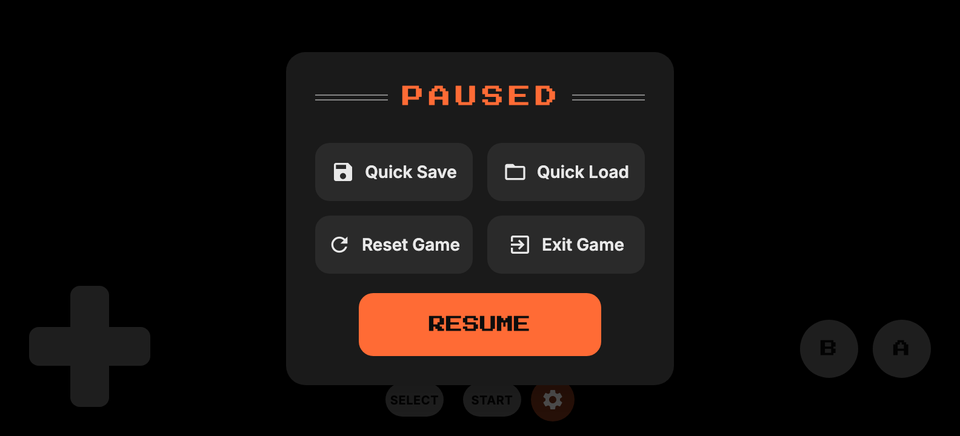
Save a moment from the pause menu and jump back to it any time. Perfect before that one impossible boss.
Auto-save and resume
Leave a game and Retro Nes Emulator saves for you. Next time it asks, “Resume from where you left off?”, and you are back in one tap.
Battery saves that last
Games with their own save slots, like the classic adventures, keep their progress on your phone, safe from cache clears and restarts.
Polite audio
A phone call pauses the game and hands it back when you are done. A notification only turns the volume down. Unplug your headphones and the game pauses instead of blasting out loud.
Designed with care
Small details that make it feel like it belongs on your phone.
Light, dark or automatic
A crisp pixel-inspired design with an arcade-orange accent, in light and dark. Follow your phone or choose your own.
Right at home on your phone
Games open in an immersive, edge-to-edge landscape view that respects camera cut-outs and gesture areas, and the app follows your reduced-motion setting.
Offline by design
The catalog lives inside the app and your games live on your device. After a game is downloaded, you never need a connection to play it.
Private by default
No account, no analytics, no tracking. Ads support the app outside the player - there is never one while you play.
A shelf you actually want to browse
Real box art, three to a row, and every game one tap from its own page. Search narrows the grid as you type, and the sort sheet reorders it by name or size without losing your place in the app.
- 210 games ready to browse the moment you open the app
- Search that highlights what matched, with recent searches saved
- Downloaded, downloading or not yet: every card shows its status
- Open a game to see its size and watch a live preview clip
Tiny files. Total control.
A slim dock rides above the navigation bar whenever something is downloading, on every screen. Tap it to open the queue, where each game can be paused, resumed or cancelled.
- Two downloads at a time; the rest queue up in order
- Automatic retry, then a clear one-tap retry if the network fails
- Files are checked on arrival; a bad one is flagged and easy to re-download
- A heads-up when storage runs low, and a hard stop before it runs out
Made for thumbs. Loved by fingers.
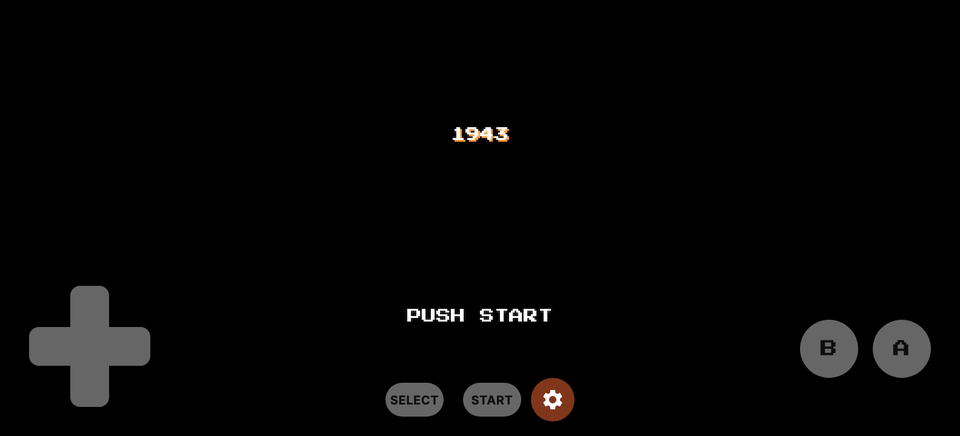
Landscape, edge to edge, with every control exactly where your thumbs already are. The pause menu is one tap away: save, load, reset or exit without ever leaving the game.
- Large D-pad and buttons, always visible, with multi-touch
- Select, Start and the menu tucked into the top corner, out of the way
- Bluetooth gamepads and keyboards work out of the box
- Quick save, quick load, auto-save and a resume prompt
Your games are yours. So is your data.
We built Retro Nes Emulator without an account system or an analytics library, so there is nothing to collect and nothing to sell. Ads (from Google AdMob) support the app, but never while you are playing.
The details, plainly
| Platform | Android 6.0 and newer, designed for phones |
|---|---|
| Catalog | 210 NES games, built into the app, with cover art and preview clips |
| Game size | Typically about 128 KB each, downloaded on demand |
| Playing | Landscape, on-screen controls, Bluetooth and USB gamepads, keyboards |
| Saves | Quick save, auto-save with a resume prompt, and cartridge battery saves |
| Internet | Only to load cover art and previews and to download games; never needed to play |
| Permissions | Internet access, network state and vibration. No location, contacts, storage, camera or microphone |
| Looks | Light, dark or follow-the-system themes; respects reduced-motion |
| Languages | English (Portuguese and Indonesian planned) |
Questions, answered
Do I need an internet connection?
Only to browse cover art and preview clips, and to download a game. Once a game is on your phone you can play it anywhere, including on a plane or underground. The catalog itself is built into the app.
Are games included in the app?
No. Retro Nes Emulator includes the emulator and a catalog listing. Each game file is downloaded to your phone only when you tap Download, from a third-party content server, and the download is what puts it on your device.
Is it legal to play these games?
An emulator is legal software, but games are protected by copyright. You are responsible for making sure you have the right to use any game you download or play, which depends on where you live and what you own.
Read our Terms of Use for the details, and please only use Retro Nes Emulator with games you are allowed to play.
Where are my games and saves stored?
In Retro Nes Emulator's private storage on your phone. Nothing is uploaded, and there is no cloud copy. Deleting a game keeps its saves; uninstalling the app removes everything.
Can I use a controller or keyboard?
Yes. Connect a Bluetooth or USB gamepad, or a keyboard, and Retro Nes Emulator maps the D-pad, face buttons, Start and Select for you. The on-screen controls stay available whenever you want them.
Does it cost anything? Are there ads?
Retro Nes Emulator is free and shows ads (from Google AdMob) to support it - a banner on the catalog and game pages, and occasionally when you exit a game. There is never an ad while you are playing. There are no subscriptions, no in-app purchases and no account to create, and Retro Nes Emulator does not collect analytics or track you. See the Privacy Policy.
Which phones does it run on?
Android 6.0 and newer. It runs well on modern phones and adapts on slower or warmer ones by simplifying the picture and sound so the game keeps its pace.
Which languages are supported?
English today. Portuguese and Indonesian are planned.

Your next favourite game is a tap away
210 classics. About 128 KB each. Zero accounts.